
Download wasavi – vim, vi, web-based, textarea, keyboard shortcuts
Overview
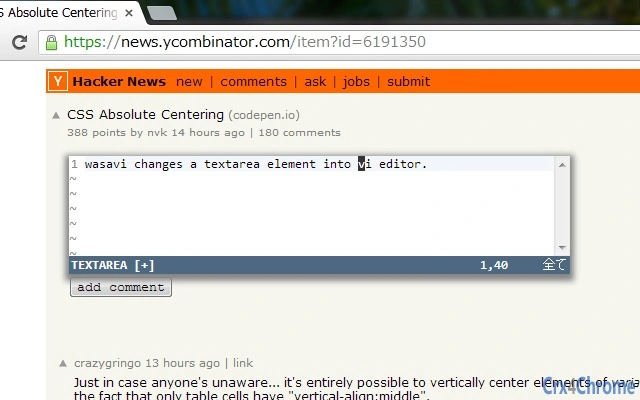
wasavi is a lightweight, web-based tool designed to transform any standard HTML TEXTAREA element into a functional vi-style editor. It enables users to leverage the powerful command-line interface of vi and vim directly within a browser environment. By simply focusing on a TEXTAREA and pressing Ctrl+Enter, the editor activates, offering a streamlined experience for users familiar with vi's modal editing workflow. The software is particularly useful for developers, web programmers, and anyone who prefers keyboard-driven text manipulation over mouse-based editing.
wasavi addresses the need for efficient text editing in web applications without requiring native software installation. It is ideal for online coding platforms, form editing, or content management systems where quick, precise text changes are essential. The tool supports core vi commands such as c (change), y (yank), d (delete), > (indent), and @ (repeat), enabling rapid editing. Additionally, it incorporates select features from vim, including incremental searching and multi-level undo/redo functionality, enhancing productivity in text-heavy workflows.
Developed by akahuku, wasavi is open-source and hosted on GitHub, allowing transparency and community contributions. Its web-based nature ensures compatibility across platforms and devices, making it accessible to users who rely on browser-based tools. The software is especially beneficial in environments where native applications are restricted or unavailable.
Key Features & Capabilities
- vi Command Support – Implements essential vi editing commands including
c,y,d,>,<,@, and*, enabling users to perform text manipulation using familiar vi syntax. - Incremental Search – Allows real-time search as characters are typed, improving navigation through large text blocks without requiring full query submission.
- Multi-Level Undo/Redo – Supports multiple undo and redo steps, preserving editing history and enabling recovery from accidental changes.
- Text Objects – Ported from vim, this feature allows users to select and manipulate structured text elements (e.g., words, sentences, paragraphs) using intuitive commands.
- Browser Integration – Activates seamlessly within any web page containing a TEXTAREA, requiring no installation or configuration.
- Keyboard-Driven Workflow – Designed for users who prefer keyboard shortcuts over mouse interactions, promoting faster and more efficient editing.
These capabilities make wasavi suitable for tasks such as editing code snippets in online IDEs, modifying form content, or quickly reformatting text in web-based editors. Its lightweight design ensures minimal impact on page performance, and its reliance on standard web technologies makes it accessible across modern browsers.
User Interface, Workflow & Performance
wasavi maintains a minimalistic interface, integrating directly into the existing TEXTAREA element. When activated via Ctrl+Enter, the editor overlays the input field with vi-style functionality while preserving the original input context. The UI remains unobtrusive, focusing on keyboard interaction rather than visual elements.
Navigating the editor follows standard vi modal behavior: command mode for issuing actions, insert mode for typing, and visual mode for selection. This workflow is consistent with vi and vim, ensuring a low learning curve for experienced users. For beginners, the transition may require some adaptation due to the modal nature of editing.
The developer did not specify resource usage details. However, given its 1.2 MB size and web-based execution, performance is expected to be efficient on modern systems. Stability is maintained through reliance on well-established browser APIs and JavaScript execution. No performance bottlenecks were reported in available documentation.
Compatibility & System Requirements
wasavi is designed as a web-based application, meaning it runs entirely within a browser environment. It is compatible with any modern web browser that supports HTML, CSS, and JavaScript. The software does not require installation, making it accessible across platforms including Windows, Mac, and Linux, as long as a compatible browser is available.
Installation size is listed as 1.2 MB, which reflects the total size of the script and assets. The developer did not provide additional system requirements. Exact hardware specifications or OS version compatibility were not listed. Platform compatibility information is limited to the browser-based nature of the tool.
Pros and Cons
Pros
- Lightweight and fast, with a small footprint of 1.2 MB
- Runs directly in the browser, no installation required
- Supports core vi commands and advanced vim features like incremental search
- Perfect for developers and power users who prefer keyboard-driven editing
- Open-source and publicly hosted on GitHub for transparency
- Seamless integration with existing web forms and TEXTAREA elements
Cons
- Requires users to be familiar with vi/vim command syntax
- Not suitable for standalone desktop editing outside of web pages
- Limited to TEXTAREA elements; cannot be used on arbitrary text fields
- No built-in syntax highlighting or file management features
- Dependent on browser performance and JavaScript support
FAQ Section
Is wasavi available for desktop use?
wasavi is a web-based tool and does not function as a standalone desktop application. It operates within a browser environment and requires a TEXTAREA element to be active.
Can I use wasavi offline?
While wasavi can be loaded from local files, its functionality depends on JavaScript execution. Offline use is possible if the script and dependencies are downloaded and hosted locally, but full functionality may vary based on browser settings.
Is wasavi safe to use?
wasavi is open-source and hosted on GitHub. The source code is publicly available for review, reducing the risk of malicious content. It runs in the browser sandbox, limiting access to system resources.
Does wasavi support syntax highlighting?
wasavi does not include built-in syntax highlighting. It focuses on vi-style editing commands and text manipulation, not code formatting or language-specific features.
How do I update wasavi?
Updates are managed through the official repository at https://github.com/akahuku/wasavi. Users can download the latest version directly from the repository or follow release notes for changes and improvements.
Final Thoughts + CTA
wasavi delivers a focused, efficient solution for users who rely on vi/vim workflows within web-based environments. Its ability to transform any TEXTAREA into a powerful command-line editor makes it a valuable utility for developers, web programmers, and power users. While it lacks standalone desktop functionality and advanced features like syntax highlighting, its lightweight design and seamless browser integration make it ideal for quick, precise text editing tasks.
For those already proficient in vi or vim, wasavi offers a natural extension of their workflow. Its open-source nature and transparent development further enhance its credibility. If you're looking for a secure, free, and lightweight tool to enhance text editing in web forms or online platforms, wasavi is a strong choice.
Download wasavi now







